Background
Recently, we received a request for help from a user who was attacked by a phishing attack. The user discovered abnormal authorization records in their wallet, attempted to revoke the authorization but was unable to do so, and provided the affected wallet address 9w2e3kpt5XUQXLdGb51nRWZoh4JFs6FL7TdEYsvKq6Wb. Our on-chain analysis revealed that the user's account owner privileges had been transferred to the address GKJBELftW5Rjg24wP88NRaKGsEBtrPLgMiv3DhbJwbzQ.
Solana Owner Modification Mechanism
Attackers successfully tricked users into clicking using two counterintuitive scenarios:
1. Normally, during transaction signing, the wallet simulates the execution result of the transaction. If there is a change in funds, it will be displayed on the interactive interface. However, the attacker's carefully crafted transaction does not show any change in funds;
2. Traditional Ethereum EOA accounts are controlled by private keys, and users are subjectively unaware of Solana's ownership.
It has the feature of being able to modify account ownership; Below, we will analyze what exactly the Solana Owner modification is.
Account Ownership
When we create an account in a wallet, the Owner is usually the system account (1111111111111111111111111111111111). During transactions, the system needs to verify whether the transaction signature is signed by the corresponding public key. You can view basic account information using the Solana Account command:
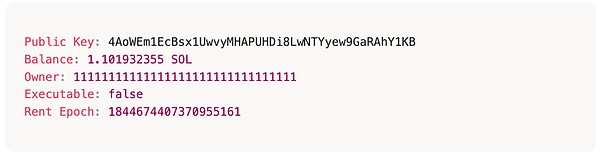
There is also a type of account called a PDA account, which is an account derived from a smart contract. It is mainly used to store smart contract data. Its owner is the smart contract that derived it. For example, an account used to store token issuance and holding information is a PDA account. When you view the basic account information using Solana Account, you can see that its owner is the Token smart contract TokenkegQfeZyiNwAJbNbGKPFXCWuBvf9Ss623VQ5DA:
![]() Both types of accounts can modify the Owner, but there are different rules and restrictions:
Both types of accounts can modify the Owner, but there are different rules and restrictions:
Regular Account
The Owner cannot be directly modified externally via commands or scripts, but it can be modified through smart contract calls. The key instructions are as follows:
![]()
PDA Account
In short, the Owner of a PDA account can be changed, but the account's data must be empty. This is also done using the assign command. We did some simple testing on the feedback of changing the Owner in several scenarios:
1. For a newly created PDA account, the Owner can be arbitrarily assigned. If the Owner is not the Program that created it, then the Program has no write permissions.
1. For a newly created PDA account, the Owner can be arbitrarily assigned. If the Owner is not the Program that created it, then the Program has no write permissions.
2. An error occurs when attempting to change the Owner of a newly created PDA account: "instruction illegally modified the program id of an account."
3. An error occurs when attempting to write data before the final assign of the PDA account: "instruction modified data of an account it does not own."
After the Owner of an account is changed, the user loses control of the account, and attackers can transfer account assets through CPI calls. Another common type of ownership change is the ownership of a token account. Essentially, this is ownership controlled by logic within a smart contract, not by the underlying Solana logic. However, it is frequently used in phishing attacks, and users should be wary of such attacks.
MistTrack Analysis
According to the on-chain tracing & anti-money laundering tool MistTrack's analysis of the victim's address 9w2e3kpt5XUQXLdGb51nRWZoh4JFs6FL7TdEYsvKq6Wb, the fund transfer path in this attack was complex. The attacker mainly diverted assets through two core addresses: BaBcXDg… (flow to 1) and 7pSj1R… (flow to 2).
Flow 1: BaBcXDgbPgn85XtEQK7TZV8kZuFpT4iWVAs4QJoyNSmd
The first main path involves assets worth approximately $2.38 million, with the core characteristics of "multi-level diffusion + decentralized deposits through CEX + multiple address transfers". The attackers used this address to exchange various tokens (including PAYAI, CASH, CARD'S, JitoSOL, POLYFACTS, PUMP, PYUSD, CAP) for SOL. Among them, PUMP was transferred to 7E4eNkK… before being exchanged for SOL. The main flows of SOL after the exchange are as follows: 1) 717.5 SOL was transferred to YDrMfsB…, some SOL was transferred to the Binance platform, and the remaining funds were dispersed and stayed in about 4 transit addresses.
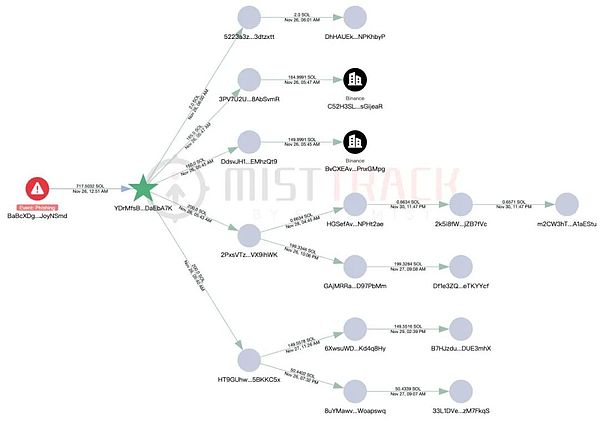
2) 7,556.89 SOL + 2,218 SOL (from PUMP exchange) were uniformly aggregated to 7E4eNkK…, then some SOL were transferred to the Letsexchange platform, 5,050.93 SOL were transferred to FyB2jDJbTdmW…, and the remaining funds were dispersed and remained in about 13 transit addresses.
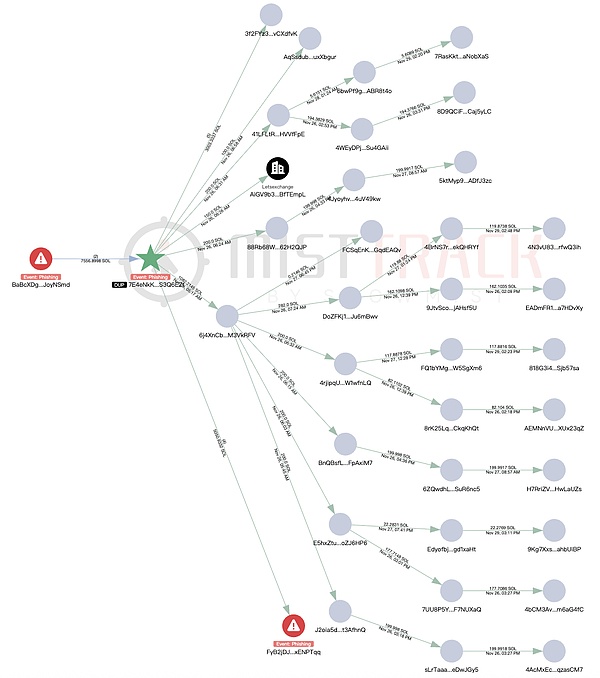
3) 2,161.88 SOL + the above 5,050.93 SOL were further dispersed in FyB2jD… and transferred to multiple platforms (HTX, Binance, Kucoin, ChangeNOW, Changelly), with some flowing into an unknown address (25nULbv…). The remaining funds were dispersed and remained in about 25 transit addresses.
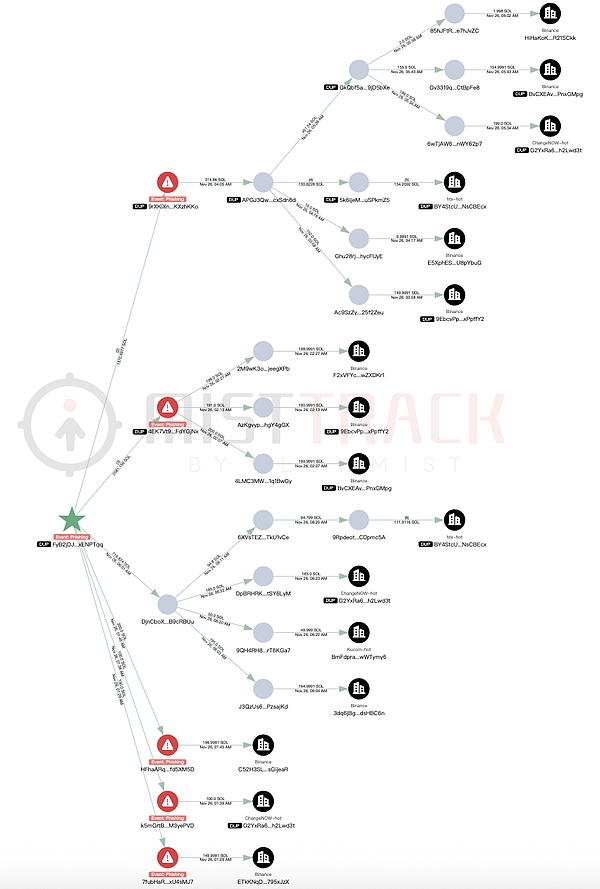
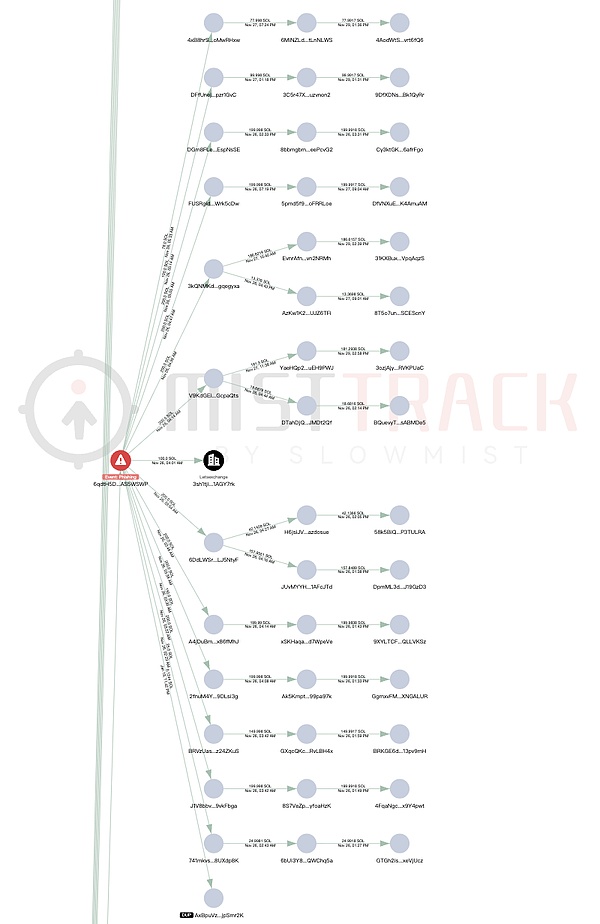
4) 2,053 SOL were transferred to 6qdtH5D…, some SOL were transferred to the Letsexchange platform, and the remaining funds were dispersed and remained in about 15 transit addresses.
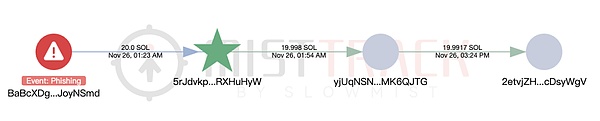
5) 20 SOL is transferred to 5rJdvkp…, then transferred and remains at address 2etvjZH….
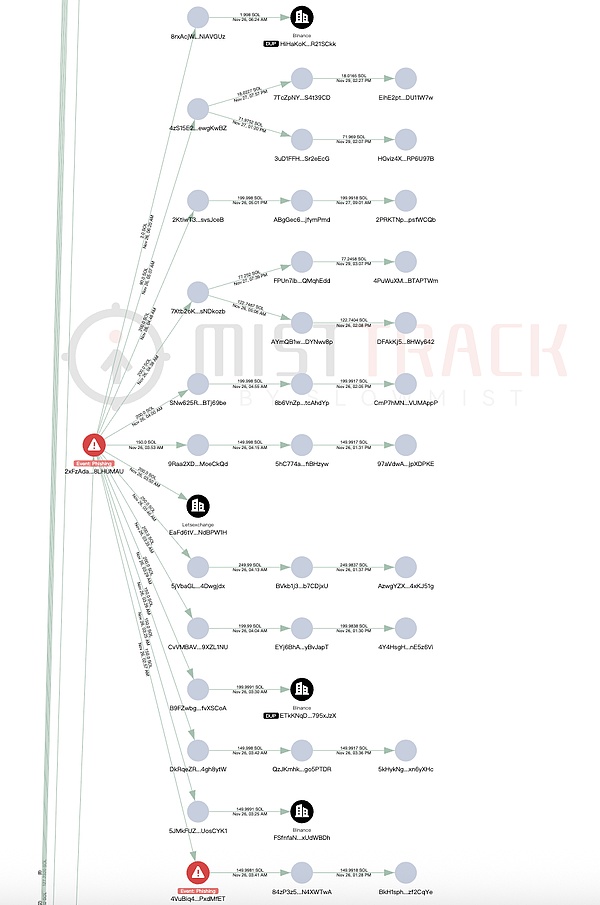
6) 2,142 SOL were transferred to 2xFzAda…, 352 SOL were transferred to the Binance platform, 200 SOL were transferred to the Letsexchange platform, and the remaining funds were dispersed and remained in approximately 11 transit addresses.
Flow 2: 7pSj1RxHf77G3XeisvnNAtbyx5AFjYPcChswWhZe9bM8
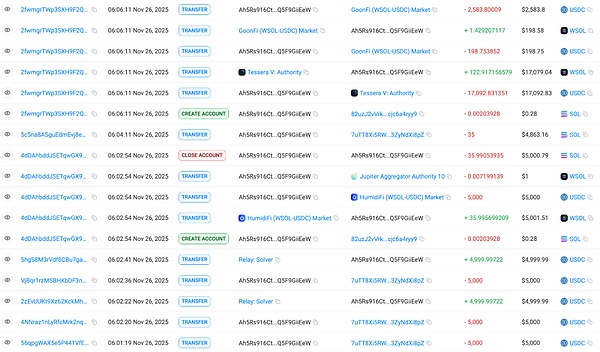
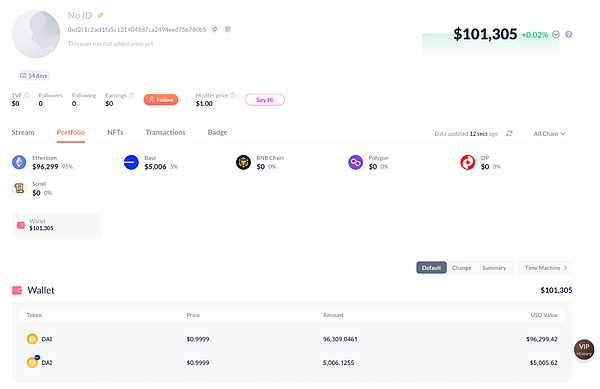
The second main path involves assets worth approximately $790,000, with the core characteristic being "cross-chain and multi-chain circular exchange". The attackers also exchanged the received tokens for SOL, with JitoSOL, PUMP, and POLYFACTS accounting for a relatively high proportion. The main destinations of the exchanged SOL are as follows: 5,742 SOL were transferred to FiywJZ2Z…, which also received 2,772.8 SOL from other phishing addresses marked as “Phishing” by MistTrack. The attackers used Relay.link to exchange 8,579.92 SOL for ETH and cross-chain to the Arbitrum address 0xDCFa6f…, then used 1inch to exchange the funds for SOL and cross-chain to multiple Solana addresses. They then repeatedly used 1inch for cross-chain operations. Details of this process are omitted here. FiywJZ2Z… transferred the remaining 215.89 SOL to Ah5Rs916…, and then exchanged it for 29,875 USDC. The USDC was then exchanged for DAI via Relay.link in increments of 5000, 5000, 5000, 5000, and 19,875.38, and transferred across chains to the Base and Ethereum addresses 0xd2c1c2A…. Two transactions of 5000 USDC were returned, and the DAI has not yet been transferred out.
DeFi Asset Rescue
In addition, the victims' remaining assets in DeFi were successfully withdrawn with the assistance of multiple parties and transferred through the address fgR5PJF…, including approximately 2.17 million PYUSD and 4548 USDC: This fund flow clearly demonstrates the attacker's behavioral pattern: rapid dispersion, multiple address redirects, multi-platform mixing, cross-chain circulation, and simultaneous deposits into CEXs and reuse of DeFi assets, constructing a multi-layered, cross-ecosystem money laundering network that greatly increases the difficulty of tracking. MistTrack has already flagged all related addresses. How to prevent similar attacks? For ordinary users, this type of attack is essentially a "phishing attack." Attackers will use various methods to package links, such as airdrops, rewards, tasks, early test qualifications, or even pretend to be official announcements, making people think it's just a simple operation. However, the pop-up signature actually hides high-risk permissions such as modifying the owner. Once signed, the wallet is basically taken over. Therefore, the most important prevention method is to think carefully before clicking on links and "signatures": Is the source trustworthy? Is this page official? What does this signature actually do? If the content that pops up in the wallet is completely incomprehensible, or if it suddenly shows some strange permissions, unfamiliar addresses, or places that inexplicably require your authorization, then you must stop and never force yourself to click confirm. Also, try not to use wallets containing large amounts of assets for extensive interactions. When completing tasks, participating in projects, or claiming airdrops, prepare a dedicated secondary account with a low balance, used solely for interaction. Keep your truly important assets in a separate wallet or even a cold wallet. This minimizes losses even if you accidentally sign in. Additionally, avoid granting unlimited authorizations; limit the scope and amount whenever possible to reduce the space for attackers to abuse the system. In short, double-check, avoid clicking or signing indiscriminately, and create layers of protection for yourself. Store large amounts of assets separately; use a secondary account for interaction, and a primary account only for safekeeping. Stop immediately if you encounter any anomalies; don't take chances. By following these steps, the risk of being targeted by phishing attacks can be significantly reduced. Finally, I highly recommend reading "The Blockchain Dark Forest Self-Help Handbook" (https://darkhandbook.io/).


 Weatherly

